Web Chat UI
Pydantic AI includes a built-in web chat interface that you can use to interact with your agents through a browser.
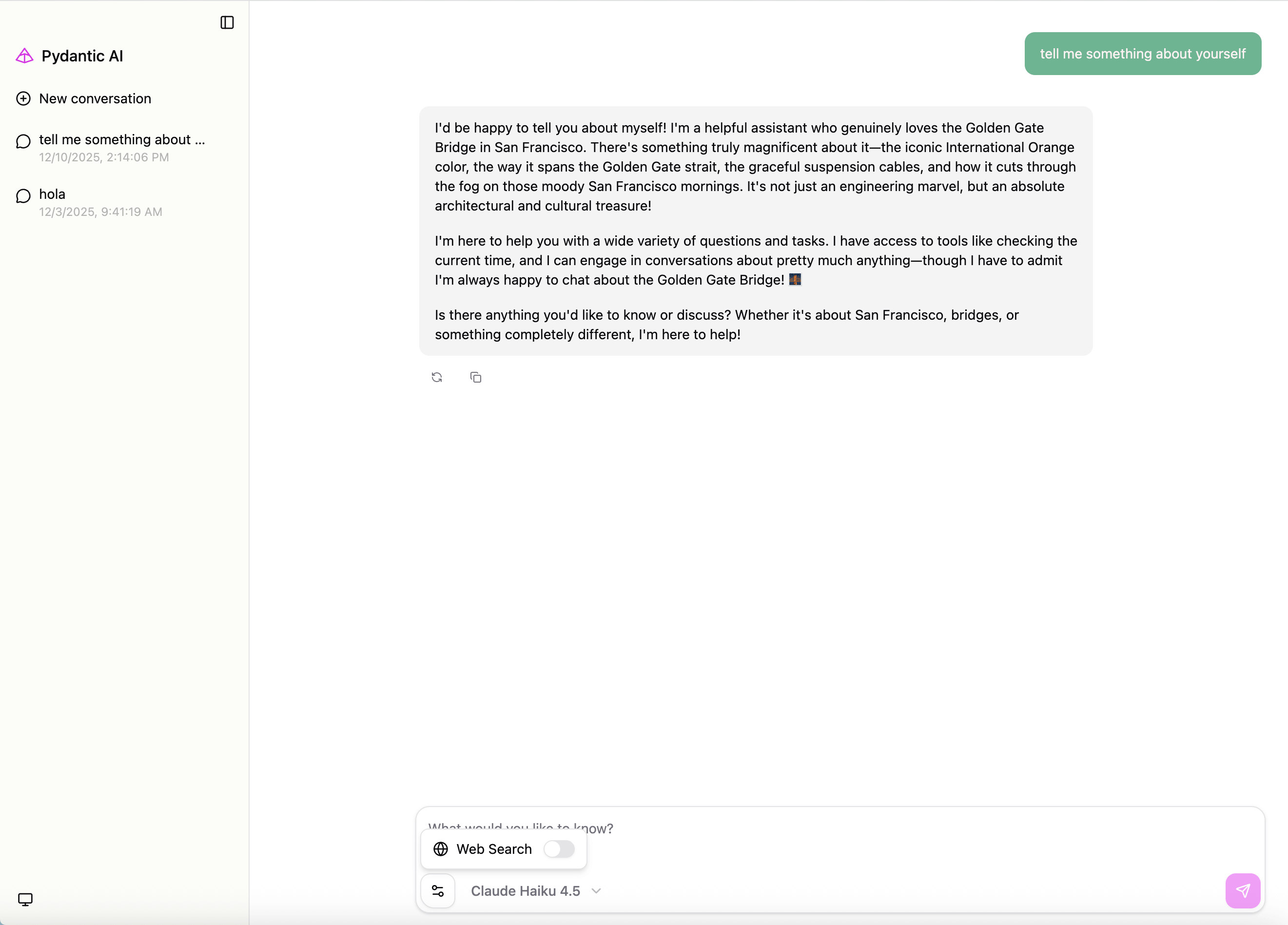
For CLI usage with clai web, see the CLI - Web Chat UI documentation.
Note
The web UI is meant for local development and debugging. In production, you can use one of the UI Event Stream integrations to connect your agent to a custom frontend.
Installation
Install the web extra (installs Starlette and Uvicorn):
pip install 'pydantic-ai-slim[web]'
uv add 'pydantic-ai-slim[web]'
Basic Usage
Create a web app from an agent instance using Agent.to_web():
from pydantic_ai import Agent

agent = Agent('gateway/openai:gpt-5.2', instructions='You are a helpful assistant.')

@agent.tool_plain
def get_weather(city: str) -> str:
    return f'The weather in {city} is sunny'

app = agent.to_web()
from pydantic_ai import Agent

agent = Agent('openai:gpt-5.2', instructions='You are a helpful assistant.')

@agent.tool_plain
def get_weather(city: str) -> str:
    return f'The weather in {city} is sunny'

app = agent.to_web()
Run the app with any ASGI server:
uvicorn my_module:app --host 127.0.0.1 --port 7932
Configuring Models
You can specify additional models to make available in the UI. Models can be provided as a list of model names/instances or a dictionary mapping display labels to model names/instances.
from pydantic_ai import Agent
from pydantic_ai.models.anthropic import AnthropicModel

# Model with custom configuration
anthropic_model = AnthropicModel('claude-sonnet-4-5')

agent = Agent('gateway/openai:gpt-5.2')

app = agent.to_web(
    models=['openai:gpt-5.2', anthropic_model],
)

# Or with custom display labels
app = agent.to_web(
    models={'GPT 5.2': 'openai:gpt-5.2', 'Claude': anthropic_model},
)
from pydantic_ai import Agent
from pydantic_ai.models.anthropic import AnthropicModel

# Model with custom configuration
anthropic_model = AnthropicModel('claude-sonnet-4-5')

agent = Agent('openai:gpt-5.2')

app = agent.to_web(
    models=['openai:gpt-5.2', anthropic_model],
)

# Or with custom display labels
app = agent.to_web(
    models={'GPT 5.2': 'openai:gpt-5.2', 'Claude': anthropic_model},
)
Builtin Tool Support
You can specify a list of builtin tools that will be shown as options to the user, if the selected model supports them:
from pydantic_ai import Agent
from pydantic_ai.builtin_tools import CodeExecutionTool, WebSearchTool

agent = Agent('gateway/openai:gpt-5.2')

app = agent.to_web(
    models=['anthropic:claude-sonnet-4-6'],
    builtin_tools=[CodeExecutionTool(), WebSearchTool()],
)
from pydantic_ai import Agent
from pydantic_ai.builtin_tools import CodeExecutionTool, WebSearchTool

agent = Agent('openai:gpt-5.2')

app = agent.to_web(
    models=['anthropic:claude-sonnet-4-6'],
    builtin_tools=[CodeExecutionTool(), WebSearchTool()],
)
Memory Tool
The memory builtin tool is not supported via to_web() or clai web. If your agent needs memory, configure the MemoryTool directly on the agent at construction time.
Extra Instructions
You can pass extra instructions that will be included in each agent run:
from pydantic_ai import Agent

agent = Agent('gateway/openai:gpt-5.2')

app = agent.to_web(instructions='Always respond in a friendly tone.')
from pydantic_ai import Agent

agent = Agent('openai:gpt-5.2')

app = agent.to_web(instructions='Always respond in a friendly tone.')
Reserved Routes
The web UI app uses the following routes which should not be overwritten:
/and/{id}- Serves the chat UI/api/chat- Chat endpoint (POST, OPTIONS)/api/configure- Frontend configuration (GET)/api/health- Health check (GET)
The app cannot currently be mounted at a subpath (e.g., /chat) because the UI expects these routes at the root. You can add additional routes to the app, but avoid conflicts with these reserved paths.
Custom HTML Source
By default, the web UI is fetched from a CDN and cached locally. You can provide html_source to override this for offline usage or enterprise environments.
For offline usage, download the html file once while you have internet access:
from pydantic_ai.ui import DEFAULT_HTML_URL

print(DEFAULT_HTML_URL)  # Use this URL to download the UI HTML file
#> https://cdn.jsdelivr.net/npm/@pydantic/ai-chat-ui@1.0.0/dist/index.html
You can then download the file using the URL printed above:
curl -o ~/pydantic-ai-ui.html <chat_ui_url>
Then use html_source to point to your local file or custom URL:
from pydantic_ai import Agent

agent = Agent('gateway/openai:gpt-5.2')

# Use a local file (e.g., for offline usage)
app = agent.to_web(html_source='~/pydantic-ai-ui.html')

# Or use a custom URL (e.g., for enterprise environments)
app = agent.to_web(html_source='https://cdn.example.com/ui/index.html')
from pydantic_ai import Agent

agent = Agent('openai:gpt-5.2')

# Use a local file (e.g., for offline usage)
app = agent.to_web(html_source='~/pydantic-ai-ui.html')

# Or use a custom URL (e.g., for enterprise environments)
app = agent.to_web(html_source='https://cdn.example.com/ui/index.html')